Sep 3, 2026Guides
Why Ribbon Width Must Be Wider Than Label Width – A Critical Rule for Thermal Transfer Printing
Using a ribbon that is narrower than your label is one of the fastest ways to damage your printhead. Learn why the ribbon must be wider, how much wider, and how to choose the right size.
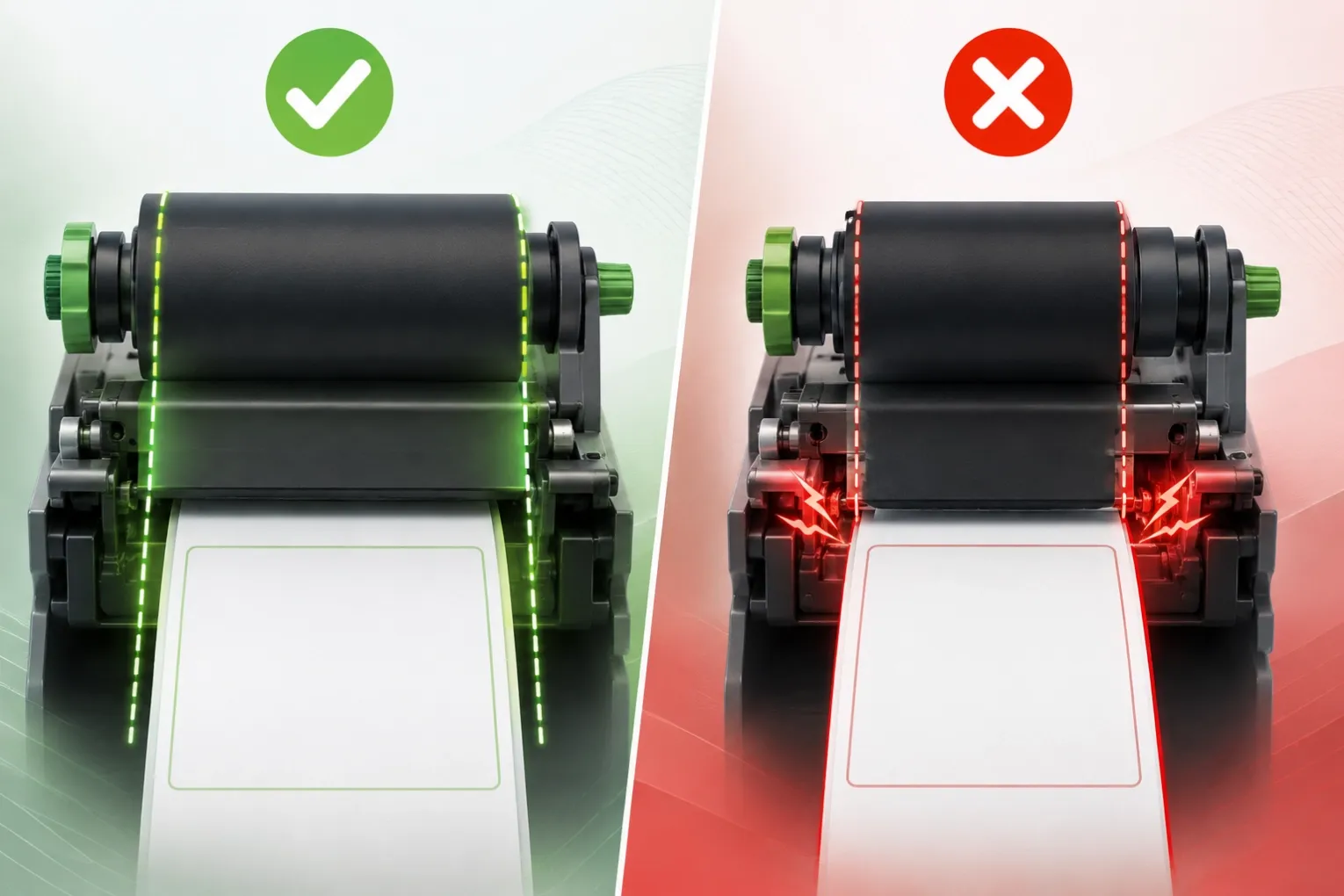
🖨️ You have selected the right ribbon type – wax, wax/resin, or resin. You have matched it to your label material. But there is one more rule that many users overlook, and it can cost you a printhead:
The ribbon must be wider than the label.
This is not a suggestion. It is a fundamental requirement for thermal transfer printing. In this guide, I will explain why this rule exists, what happens when you break it, and how to choose the correct ribbon width for your printer.
1. The Basic Rule – Ribbon Wider Than Label 📏
The rule is simple: the ribbon width must be greater than the label width – and ideally, greater than the full media web including the liner.
Component | Width Relationship |
|---|---|
Label (face stock) | The printable surface |
Label liner / carrier | The backing material |
Ribbon | Must be wider than the label and the liner |
How much wider?
Source | Recommended Overhang |
|---|---|
General rule of thumb | 1/8" to 1/4" (3–6mm) wider than the label liner |
Industry standard | 2–3mm wider on each side of the label web |
Some manufacturers | 5–10mm wider than the label |
Zebra recommendation | Ribbon must be as wide as or wider than the media |
💡 The golden rule: When in doubt, choose a ribbon that is 2–5mm wider than your label on each side. For a 50mm label, use a 60mm ribbon.
2. Why This Rule Exists – Three Critical Reasons 🔧
A. Printhead Protection (The Primary Reason)
The thermal printhead is the most expensive consumable in your printer – often costing several hundred dollars. It contains a line of tiny ceramic heating elements (dots) that must be protected.
When the ribbon is narrower than the label, the edges of the label come into direct contact with the printhead. The label material – especially synthetic materials like PET or paper with abrasive coatings – will abrade the printhead surface.
Scenario | Result |
|---|---|
Ribbon wider than label | Ribbon acts as a cushion – printhead is protected |
Ribbon narrower than label | Printhead rubs directly against label edges – accelerated wear |
The consequence: Areas of the printhead that are NOT protected by ribbon will wear out prematurely and may suffer permanent damage.
Zebra ribbons, for example, have a coating on the back that specifically protects the printhead from wear. This protective layer only works if the ribbon covers the full width of the printhead.
B. Preventing Adhesive Contamination
Labels have adhesive on the back. When the label passes through the printer, the edges of the label – and especially the liner – can carry small amounts of adhesive residue.
If the ribbon is narrower than the label, the exposed edges of the printhead can come into contact with this adhesive. Over time:
- Adhesive builds up on the printhead surface
- Print quality degrades (faded or missing dots)
- The printhead overheats in contaminated areas
- Permanent damage occurs
A ribbon that is slightly wider than the label acts as a barrier, preventing the printhead from touching the label edges and the adhesive they carry.
C. Protecting All Printhead Elements
The printhead's heating elements run across the full width of the printhead. If the ribbon is narrower than the label, some heating elements are exposed to direct contact with the label. This creates uneven wear:
Printhead Area | Exposure | Wear Rate |
|---|---|---|
Covered by ribbon | Protected | Normal |
Exposed to label | Unprotected | Accelerated |
The result is uneven printhead wear – some dots wear out faster than others, leading to inconsistent print quality and premature failure.
3. What Happens When You Use a Ribbon That Is Too Narrow ❌
Problem | Consequence |
|---|---|
Printhead abrasion | The label edge rubs against the ceramic heating elements – scratches and wear |
Adhesive residue buildup | Label adhesive transfers to the printhead – causes overheating and print defects |
Uneven print quality | Some heating elements wear faster than others – inconsistent darkness across the label |
Premature printhead failure | Printhead life can be shortened by 50% or more |
Costly replacements | A new printhead can cost |
The irony: Users who try to save money by using a narrower ribbon often end up spending far more on printhead replacements.
4. What About Using a Ribbon That Is Too Wide? ⚠️
While a ribbon that is too narrow is dangerous, a ribbon that is too wide also has drawbacks:
Problem | Cause | Solution |
|---|---|---|
Ribbon wrinkling | Excess ribbon width causes creasing | Choose a ribbon that is only slightly wider (not excessively wide) |
Ribbon waste | Unused ribbon is discarded | Balance protection with cost – don't over-size |
Printer compatibility | Ribbon must fit within the printer's maximum width | Check your printer's specifications |
The sweet spot: Choose a ribbon that is wide enough to protect the printhead but not so wide that it causes wrinkling or waste. A 2–5mm overhang on each side is the industry standard.
5. How to Choose the Right Ribbon Width – Step by Step 🎯
Step 1: Measure Your Label Width
Measure the full width of the label including the liner (the backing material). This is the "media web" width.
Step 2: Calculate the Recommended Ribbon Width
Rule | Calculation |
|---|---|
Minimum | Label width + 4mm (2mm each side) |
Recommended | Label width + 6–10mm (3–5mm each side) |
Safe maximum | Label width + 12mm (6mm each side) |
Example: If your label is 50mm wide (including liner), choose a ribbon that is 54–60mm wide.
Step 3: Check Printer Compatibility
- The ribbon must fit within your printer's maximum ribbon width
- The ribbon core must match your printer (1" or 0.5" core)
- The ribbon must be available in the width you need
Step 4: Consider Your Label Material
Label Material | Recommended Overhang |
|---|---|
Paper | 2–3mm each side |
Synthetic (PET, PP, PI) | 3–5mm each side (more abrasive) |
Thermal transfer paper | 2–3mm each side |
Step 5: Test Before Bulk Ordering
- Order a sample roll in the recommended width
- Print test labels and check for:
- Wrinkling
- Complete ink transfer
- Printhead condition after a few rolls
6. Common Mistakes to Avoid ❌
Mistake | Consequence |
|---|---|
Using a ribbon narrower than the label | Printhead abrasion and premature failure |
Using a ribbon that is exactly the same width as the label | No margin for error – slight misalignment exposes printhead |
Not measuring the liner width | Ribbon may be narrower than the full media web |
Choosing a ribbon that is too wide | Wrinkling and waste |
Ignoring the printer's maximum width | Ribbon will not fit |
✅ Always choose a ribbon that is slightly wider than your label – it is the cheapest insurance for your printhead.
7. The Cost-Benefit Analysis 💰
Scenario | Cost |
|---|---|
Correct ribbon width (2–5mm overhang) | Slightly more ribbon used – minimal cost increase |
Narrow ribbon | Printhead replaced 2–3× more often – |
Wide ribbon | Ribbon waste – but still cheaper than a new printhead |
The bottom line: The small additional cost of a slightly wider ribbon is insignificant compared to the cost of replacing a damaged printhead.
For durable, high-quality ribbons in the correct widths, see our Resin Ribbon and Wax/Resin Ribbon ranges.
8. Summary & Next Steps 🎯
- The ribbon must be wider than the label – this is a fundamental rule of thermal transfer printing.
- Primary reason: Protect the printhead from abrasion and adhesive contamination.
- Recommended overhang: 2–5mm wider on each side of the label.
- Too narrow = printhead damage – accelerated wear, uneven print quality, premature failure.
- Too wide = wrinkling and waste – but still safer than too narrow.
- Always measure the full media web – including the liner, not just the label face.
Need help choosing the right ribbon width? We offer ribbons in standard widths from 40mm to 110mm. Send us your label size and printer model – we will recommend the correct width and send a free sample for you to test.